Ask us on the help form and we’ll reply by email.
Get started with FieldFlow
Create your account, confirm your email, set up your business on the web or the phone, and work through the first-job card and setup checklist during the free trial.
Applies to: Owners, Admins, on the web and the phone app. Last checked 2026-10-17.
Create your account
Sign up on the web or in the phone app, with an email and password or with Google or Apple. In the phone app, Sign in with Apple is offered on iPhone only.
If you sign up with an email, FieldFlow sends a confirmation link. The link always opens in a browser, so you finish setting up there. You can also go back to the phone app and sign in once your email is confirmed.
Every new business starts with a 90-day free trial. No card is needed to start. For what the plan costs after the trial, see pricing.
Set up your business
Both apps run the same three-step setup: your business details, your trade, then your first clients. Your workspace is created when you choose your trade. Finish works with no clients at all, so you can add them later.
On the web
On the clients step, type a few names (a phone number is optional), or bring your list over:
- Import a file: a spreadsheet saved as CSV, or your phone’s contacts
exported as a
.vcffile. - From QuickBooks: connect and pick which customers to bring over.
The import opens right after setup. If you leave the wizard before the clients you typed are saved, the dashboard offers Add now, as long as you’re still in the same browser tab.
On the phone
On the clients step, type a few names (Add Another adds a row), or choose one of these:
- Pick from contacts: choose people from your phone’s address book.
- Import a file: a spreadsheet saved as CSV.
- From QuickBooks: connect and pick which customers to bring over.
The import opens right after you finish setup.
Your first job
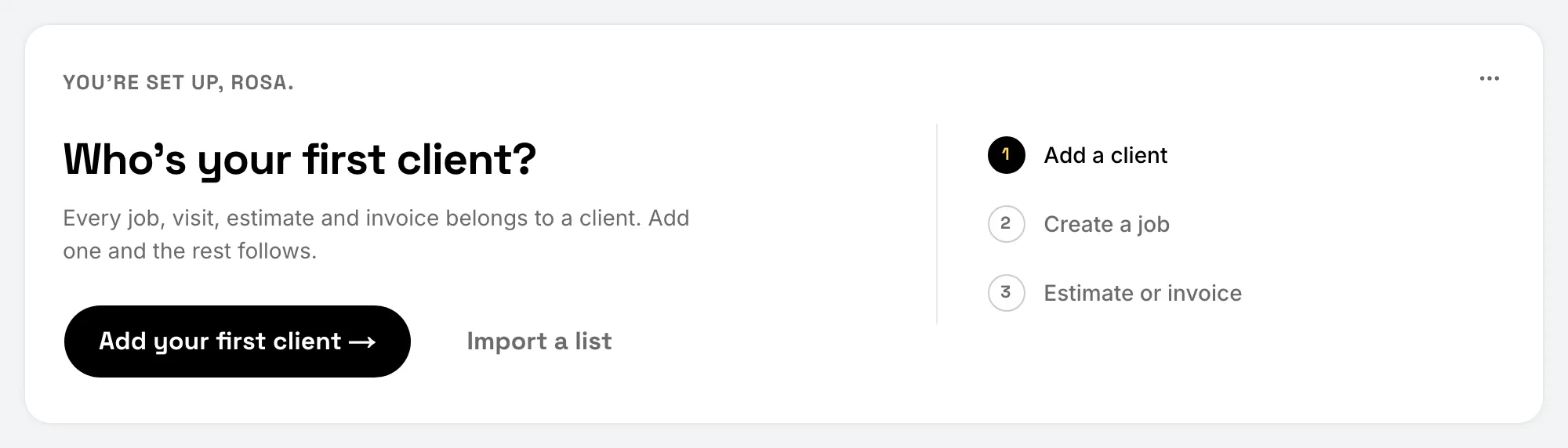
Home shows a first-job card that walks you through three steps:
- Add your first client.
- Create your first job. A job does not need a date.
- Create your first estimate or invoice. A draft counts.
You can do steps 2 and 3 in either order. Steps are checked off from what is in your account. Use the card’s menu to choose Hide for Today, or Don’t Show Again. You can bring the steps back from Settings › Getting Started.
Finish the setup checklist
The setup checklist covers the rest. You’ll find it on Home and in Settings › Getting Started:
- Finish your business profile
- Set your default tax rate
- Connect Stripe for online payments (the owner only; see Connect Stripe)
- Set up your branding (logo, colors, font and document template)
- Add services to your price book
- Invite a team member
- Configure automated reminders
- Set up review requests
- Ask Flow AI
Most items check themselves off once the thing is done. You can dismiss the optional ones.
When the trial ends
If the trial ends without a subscription, the account becomes read-only. You can still see everything and issue refunds, but you can’t add or change records until you subscribe. Subscribing is done on the web. The phone app has no purchase path.
Still stuck? Contact us.