Ask us on the help form and we’ll reply by email.
How clients pay online
What your client sees on the invoice page, how a card or bank payment lands on the invoice, and how to list other ways to pay such as checks, Venmo or Zelle.
Applies to: Owners, Admins, on the web and the phone app. Last checked 2026-10-17.
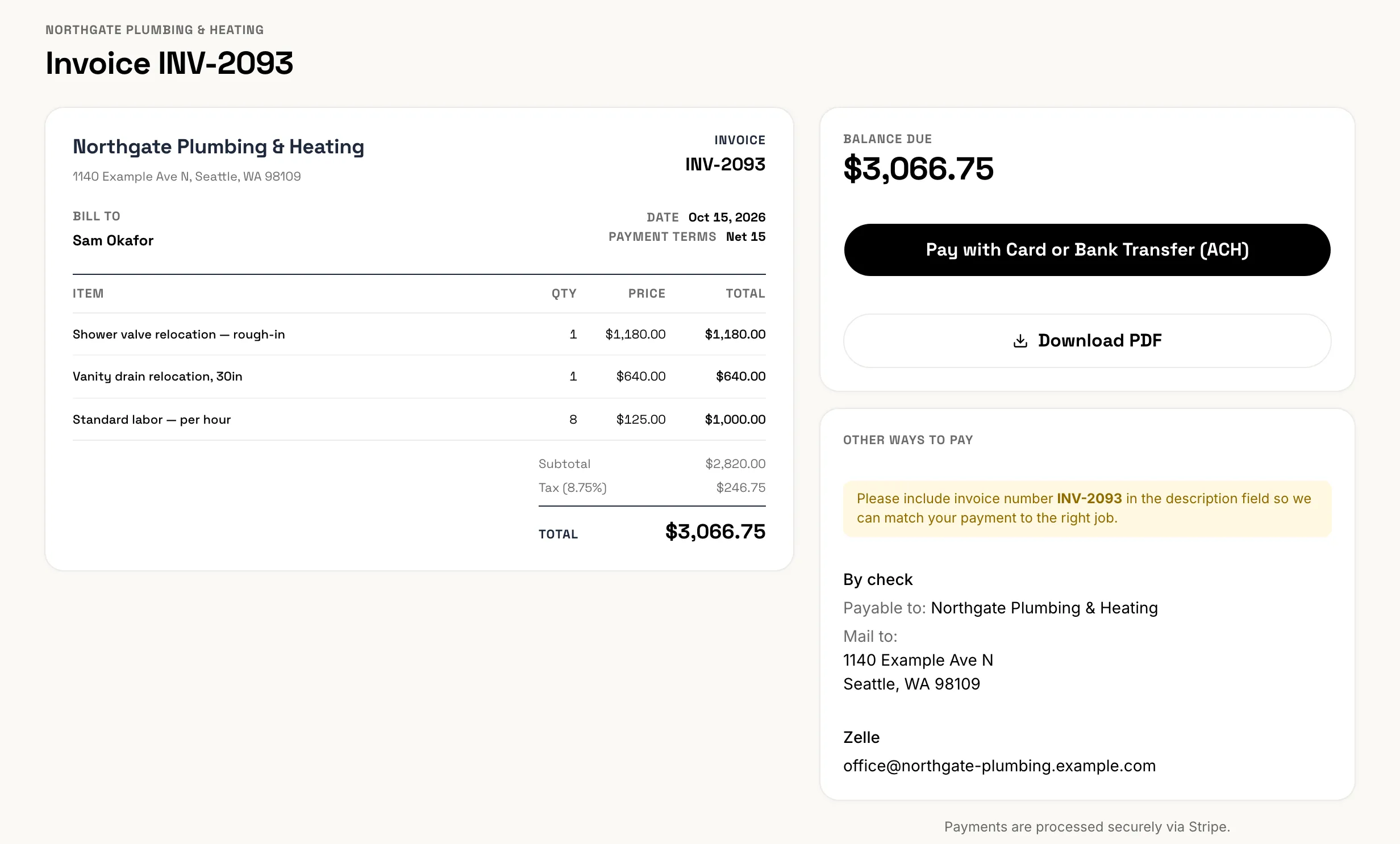
When you send an invoice, its link opens the invoice page. There your client can see the invoice, download a PDF and pay. FieldFlow takes a small platform fee on each online payment, and Stripe charges its processing fee. Both are listed on the pricing page.
Before you start
Online payment needs a connected Stripe account. Only the owner can connect it: see Connect Stripe. Until then, the invoice page shows only the other ways to pay you’ve listed, or asks the client to contact you.
What the client does
- They open the invoice from your email or text.
- They choose Pay Online.
- They pay on Stripe’s checkout page.
The online payment is always the whole balance due. Bank transfer is offered when your Stripe account accepts it; otherwise checkout takes cards only.
Deposit invoices work the same way. After a client signs an estimate online, the Pay deposit button opens the deposit invoice.
When the money arrives
You don’t record online payments yourself. FieldFlow adds the payment to the invoice and updates the balance. You get a notification, if Payment received is on in Settings › Notifications.
A bank transfer takes a few days to clear. Until it does, the invoice shows a Payment processing note, and the balance updates once the money settles. Don’t record a check for the same invoice meanwhile.
If a client disputes a card payment with their bank, owners and admins are alerted. While the dispute is open the payment can’t be refunded. If the dispute is lost, the invoice owes that amount again.
Other ways to pay
You can list ways to pay outside Stripe. They show on every invoice page under Ways to pay, or Other ways to pay when card checkout is there too. The client is asked to put the invoice number in their payment.
- Open Settings, then Payments. On the phone, tap More, then Settings, then Payments.
- In Other payment methods, fill in what you accept: who checks are payable to and where to mail them, your Venmo, PayPal or Zelle details (with a QR code if you like), Apple Cash, and any Other instructions.
- Save with Save Payment Methods.
Like Stripe, these settings are for the owner only. When a client pays you this way, record the payment yourself: see Record a payment.
Still stuck? Contact us.