Ask us on the help form and we’ll reply by email.
Refunds and credit notes
Give money back or take money off an invoice with a credit note. See when a refund goes back through Stripe, when it's a manual refund, and why a refund never reopens an invoice.
Applies to: Owners, Admins, on the web and the phone app. Last checked 2026-10-17.
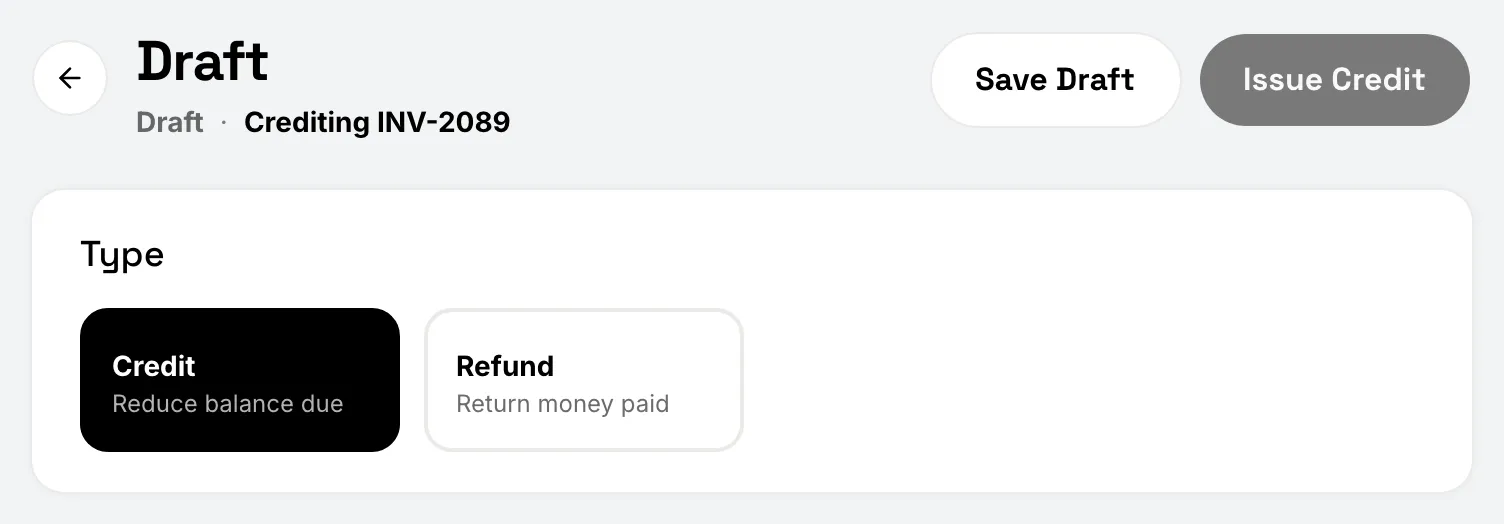
A credit note changes an issued invoice without editing it. It comes in two types:
- Credit (Reduce balance due) takes money off what the client still owes, for example a discount you agreed after sending. It needs a balance due.
- Refund (Return money paid) gives back money the client already paid. It needs a payment on the invoice.
Owners and admins can issue them. Every credit note is listed under Refunds & Credits.
On the web: start a credit note
Open the invoice. In the Payments card, choose Issue Refund or Credit. You can also choose Refund from the … (More actions) menu when the invoice has a payment.
On the phone: start a credit note
Open the invoice and tap Issue Refund or Credit in its payments section, or Refund in the … (More actions) menu.
Fill it in
- Under Type, pick Credit or Refund. A type that doesn’t fit the invoice is greyed out, with the reason.
- Tick the invoice lines to credit, or add an adjustment with its own description and amount.
- Add notes for the client if you like.
- Choose Save Draft to finish later, or Issue Refund or Issue Credit, then confirm.
Once issued, a credit note can’t be edited or deleted. From the credit note you can choose Email to Client, Download PDF or View Original Invoice.
Where a refund’s money goes
- Back through Stripe. If the client paid online and one of those payments has enough left to cover the whole refund, issuing it refunds that payment through Stripe. The money goes back to how they paid.
- A manual refund. If the invoice was paid by cash, check or another way outside Stripe, the refund is recorded as a manual refund. It moves no money: you give it back yourself, then record it here.
- Your choice. If an online payment is part of it but none covers the whole refund, FieldFlow asks. Refund up to what that payment has left in this credit note, or choose Record as manual refund if you paid the client back another way.
A refund never reopens an invoice
A refund never makes the invoice owe more. The refunded amount counts as a credit on the invoice, so its balance due stays where it was, and a paid invoice stays settled. If you need the client to pay again, send a new invoice.
The one exception is a card dispute you lose: when the client’s bank takes a card payment back, the invoice owes that amount again.
While your account is read-only
Refunds still go through, because it’s the client’s money. A credit waits until you subscribe.
Still stuck? Contact us.