Text messaging: FieldFlow Alerts
Last updated: October 1, 2026
FieldFlow Alerts is the text message program of FieldFlow LLC ("FieldFlow"), the company behind the FieldFlow field service app. It sends a FieldFlow account's own owners and admins a verification code for their mobile number and the business alerts they choose to turn on.
Who sends the texts
FieldFlow LLC, from FieldFlow's own phone number. Every text starts with "FieldFlow:" or names FieldFlow Alerts.
Who gets them
Only FieldFlow account owners and admins who turn on text alerts in their own settings, at a US mobile number they verify with a one-time code. FieldFlow does not text your customers, your crew, your subcontractors or anyone else, and never texts a number that hasn't been verified by its owner.
What we send
- A one-time verification code when you verify your mobile number for alerts.
- One welcome text once your number is verified.
- The alerts you turn on: an estimate approved by a customer, a payment received, and a daily summary of overdue invoices.
No marketing, promotions or advertising are sent through this program.
Sample messages
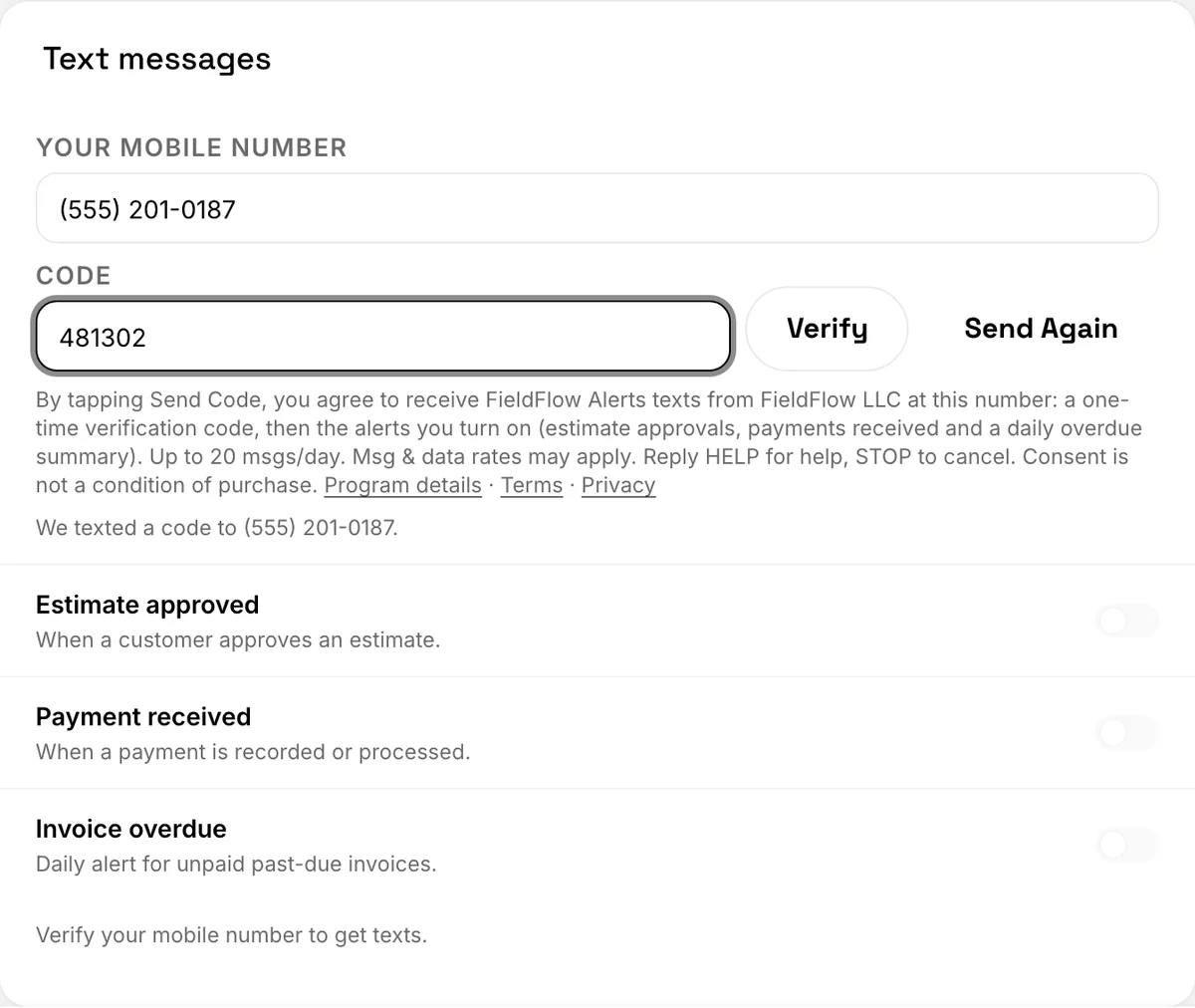
- Verification code: "FieldFlow: your code is 481302. Msg & data rates may apply. Reply STOP to stop."
- Welcome (once, after you verify): "FieldFlow: You're set up for text alerts about your business (estimate approvals, payments, overdue invoices). Up to 20 msgs/day. Msg & data rates may apply. Reply HELP for help, STOP to cancel."
- Estimate approved: "FieldFlow: Jane Doe approved estimate EST-0012 ($1,250.00). app.fieldflowusa.com Reply STOP to stop."
- Payment received: "FieldFlow: $480.00 payment received from Jane Doe on invoice INV-0042. app.fieldflowusa.com Reply STOP to stop."
- Daily overdue summary: "FieldFlow: 3 invoices are overdue ($2,140.00 owed). app.fieldflowusa.com/invoices Reply STOP to stop."
How often
Message frequency varies with your business: typically a few texts a week, never more than 20 a day per person. The overdue summary is at most one text a day.
How to opt in
Text alerts are off until you turn them on. In the FieldFlow web app or phone app:
- Enter your mobile number. Sign in to FieldFlow as the business owner or an admin, open Settings › Notifications and find Text messages. Type the US mobile number you want your alerts on.
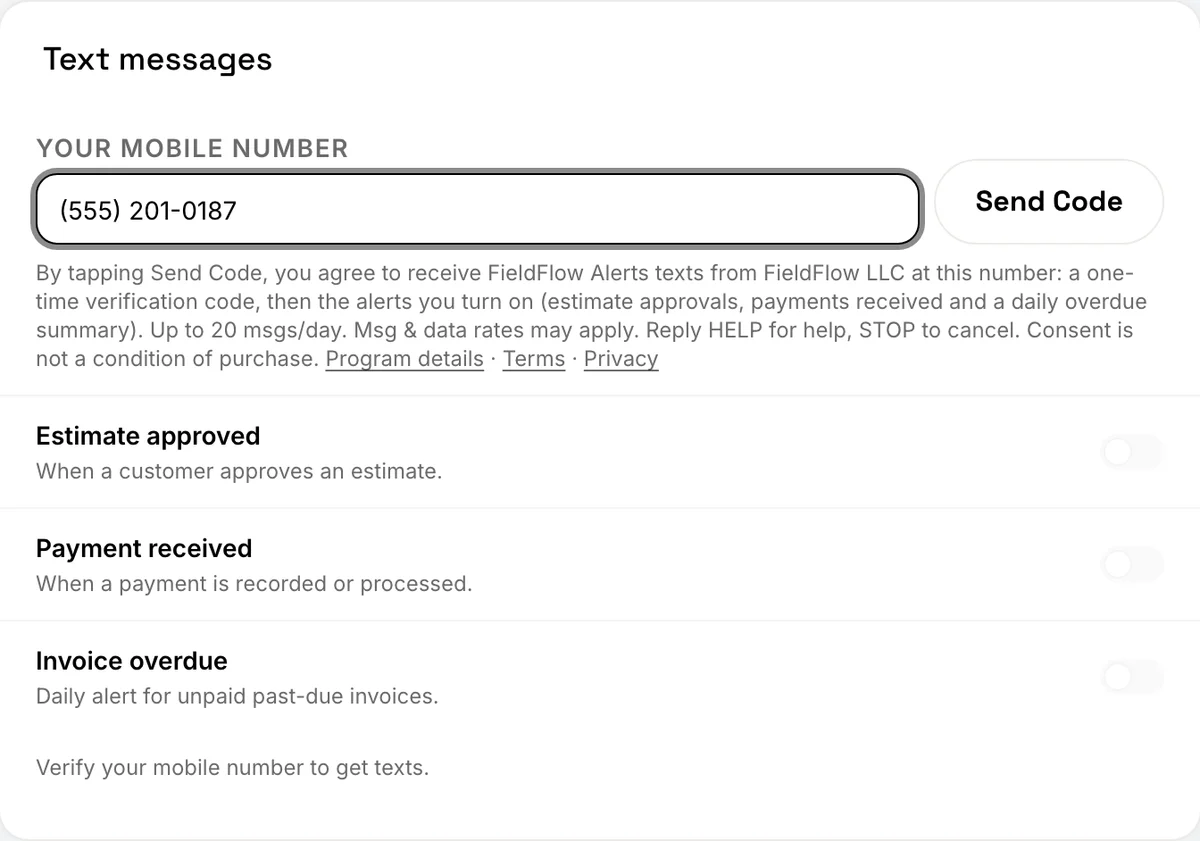
- Read the disclosure, then tap Send Code. The disclosure under the number says who texts you, what we send, how often, that message and data rates may apply, and how to get help or stop. Tapping Send Code is your agreement to it. We text a one-time 6-digit code to the number.
- Enter the 6-digit code. Type the code from the text and tap Verify. This proves the number is yours; nothing else is sent until you turn an alert on.
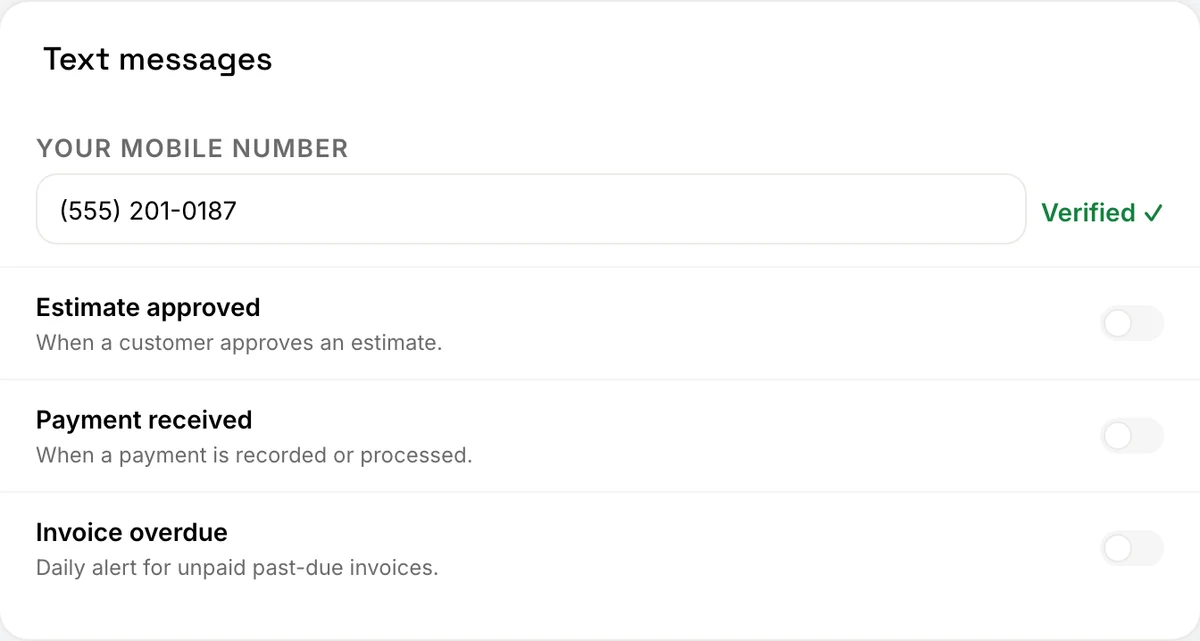
- Your number is verified. The number shows Verified and we send one welcome text confirming you are set up. The alert switches can now be turned on; they all start off.
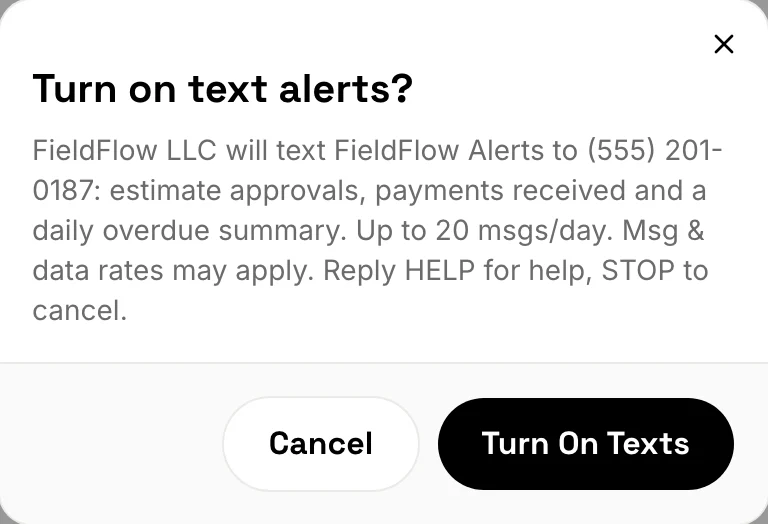
- Turn on the alerts you want. Switch on any of Estimate approved, Payment received and Invoice overdue. The first time, FieldFlow shows the full disclosure again and asks you to confirm.
- You are opted in. The switches you turned on stay on, and the card shows where texts go and how to stop them. Turn a switch off at any time to stop that alert.
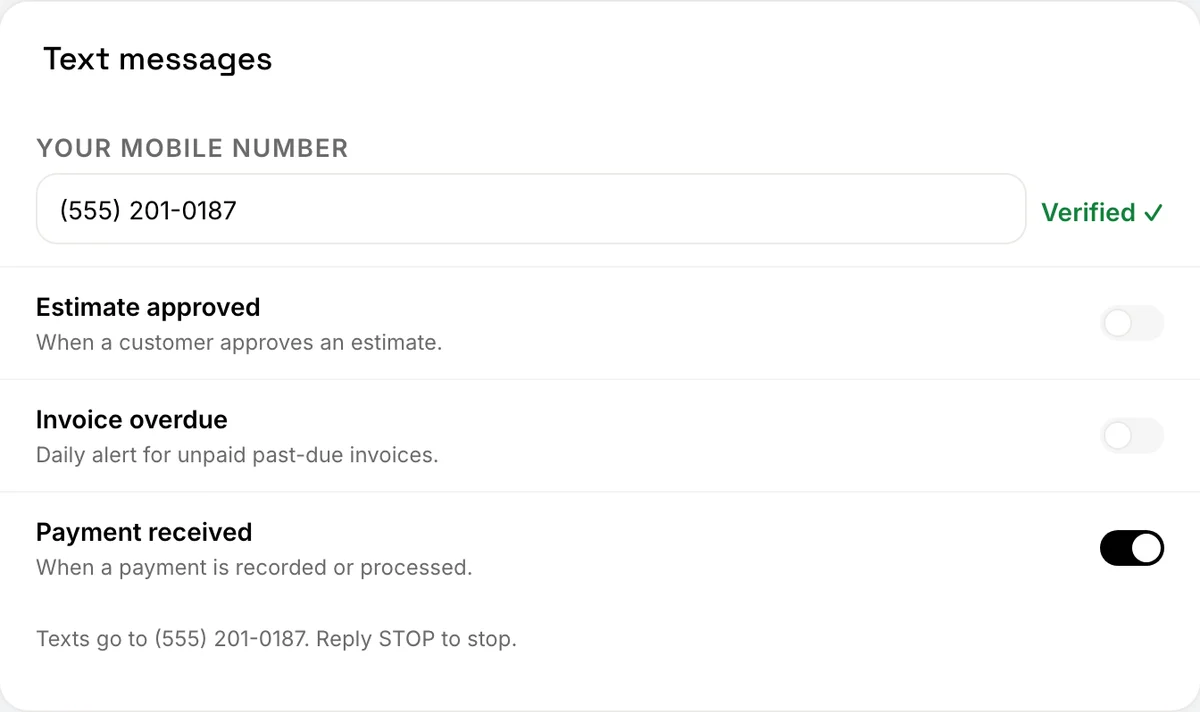
The disclosure the app shows
Under the mobile number field, before you tap Send Code:
By tapping Send Code, you agree to receive FieldFlow Alerts texts from FieldFlow LLC at this number: a one-time verification code, then the alerts you turn on (estimate approvals, payments received and a daily overdue summary). Up to 20 msgs/day. Msg & data rates may apply. Reply HELP for help, STOP to cancel. Consent is not a condition of purchase.
When you turn on your first alert (shown with your own number):
FieldFlow LLC will text FieldFlow Alerts to (555) 201-0187: estimate approvals, payments received and a daily overdue summary. Up to 20 msgs/day. Msg & data rates may apply. Reply HELP for help, STOP to cancel.
Consent to receive texts is not a condition of buying or using FieldFlow.
The welcome text
Sent once when your number is verified:
FieldFlow: You're set up for text alerts about your business (estimate approvals, payments, overdue invoices). Up to 20 msgs/day. Msg & data rates may apply. Reply HELP for help, STOP to cancel.
How to opt out
Reply STOP to any FieldFlow text (STOPALL, UNSUBSCRIBE, CANCEL, END and QUIT work too), or turn the alert switches off in Settings › Notifications › Text messages. After STOP we send one last text to confirm, and nothing more until you reply START:
FieldFlow: You're unsubscribed from FieldFlow Alerts and will get no more texts from this number. Reply START to resubscribe.
Replying START turns texts back on:
FieldFlow: You're resubscribed to FieldFlow Alerts. Up to 20 msgs/day. Msg & data rates may apply. Reply HELP for help, STOP to cancel.
Help
Reply HELP to any FieldFlow text, or email hello@fieldflowusa.com. The HELP reply:
FieldFlow Alerts from FieldFlow LLC: account alerts and verification codes for FieldFlow users. Help: hello@fieldflowusa.com or fieldflowusa.com/sms. Up to 20 msgs/day. Msg & data rates may apply. Reply STOP to cancel.
Costs and delivery
Message and data rates may apply. FieldFlow does not charge for these texts. Carriers are not liable for delayed or undelivered messages.
Your information
We do not sell or share your SMS opt-in data or personal information with third parties for marketing purposes. Your number and consent are used only to send the texts described here. Texts are delivered through our messaging provider, Twilio.
See our Terms of Service (section 6, Text Messaging) and our Privacy Policy.